Product Overview
Everything in one glance — hardware, software, and the training use-case it solves.
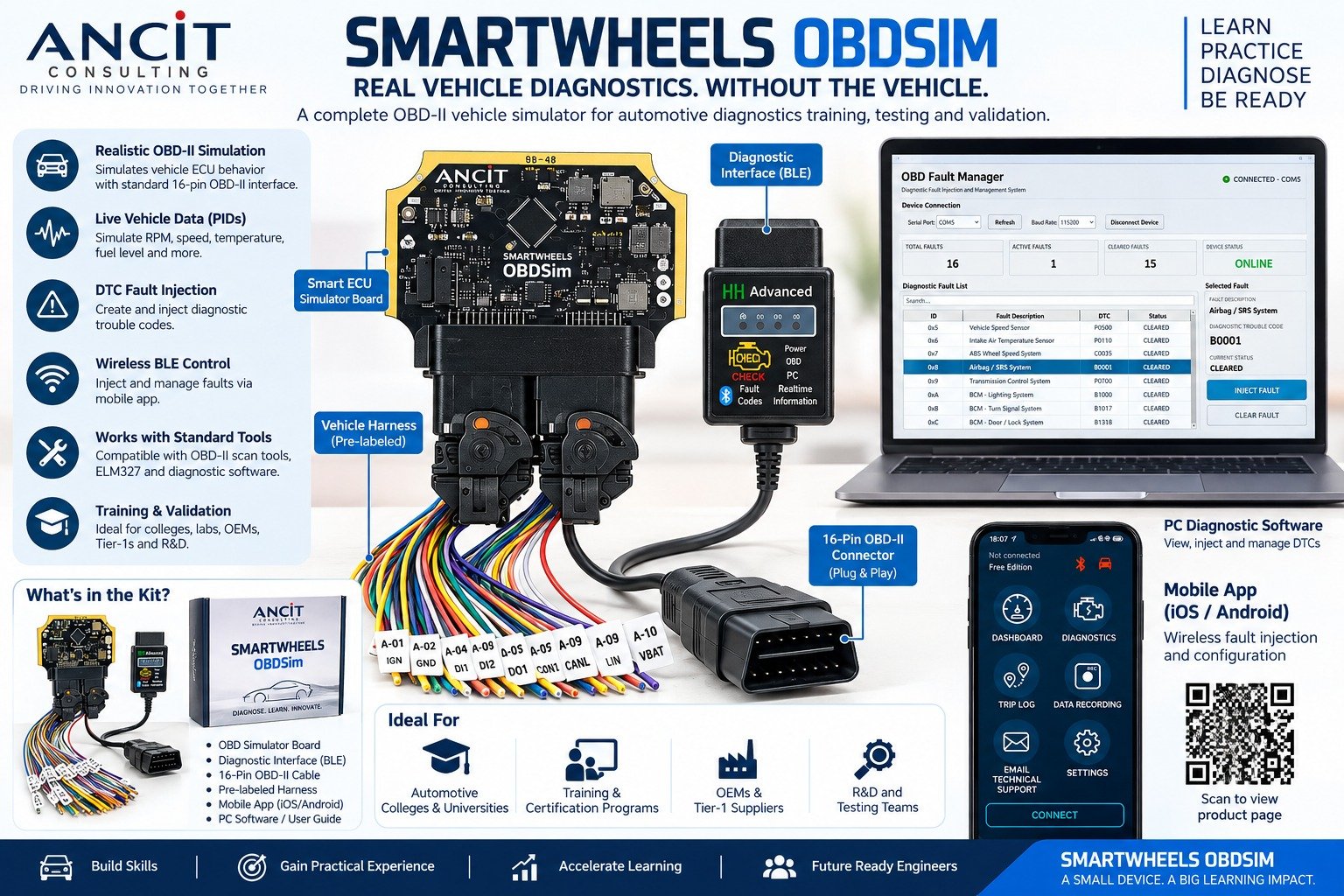
A SmartWheels ECU that acts as a real vehicle — responding to OBD diagnostic requests over a physical 16-pin OBD connector, just like a production car. No vehicle. No workshop. Full OBD training in any classroom.
OBD-II Mode 01–09 | DTC Simulation | BLE Fault Injector | Real ELM327 Compatible
Connection Topology
Everything in one glance — hardware, software, and the training use-case it solves.
Three components. One complete OBD training session.
The trainer uses the SmartWheels OBDSim Fault Injector app on a phone or tablet to wirelessly inject any DTC into the ECU over Bluetooth. No cables, no firmware flashing, no downtime between scenarios. Inject a fault, ask the student to diagnose — clear it, inject the next one. A full fault training session runs without touching the hardware.
Hardware and software — everything needed to run an OBD diagnostic session.
The core hardware — pre-flashed with SmartWheels OBDSim firmware. Acts as the vehicle ECU, holding a configurable PID library and DTC store. Connects directly to the OBD port.
View SmartWheelsStandard J1962 female OBD-II connector wired to the ECU. Students plug in any ELM327 dongle or handheld scan tool — exactly the same action as in a real vehicle.
Bluetooth Low Energy module embedded in the ECU for wireless communication with the Fault Injector app. Range covers a full training room — no pairing required per session.
Trainer's Android/iOS app to select and inject any DTC over BLE, set live PID values (speed, RPM, temperature, fuel level), and clear faults between student sessions.
Powers the ECU from any USB-C source — a laptop port, a power bank, or a wall adapter. No 12 V automotive supply needed for classroom use.
Step-by-step trainer guide: PID read exercises, fault injection scenarios, freeze frame capture, MIL-on/off sequences — structured as a progressive skill-build programme.
SmartWheels OBDSim responds to standard OBD-II service requests — the same modes used by scan tools and diagnostic apps in the field.
Engine speed, coolant temp, vehicle speed, O2 sensor, fuel level, throttle position, and more
Snapshot of PID values at the moment a DTC was set — exactly as stored in a production ECU
Read active powertrain fault codes. Inject any P0xxx–P3xxx code via the BLE Fault Injector app
Student or trainer clears stored faults and resets the MIL indicator to start a fresh scenario
Faults detected in the current drive cycle but not yet confirmed — used in intermittent fault exercises
VIN, calibration ID, IUPR data — for exercises on scanner setup, vehicle identification, and records
Run full OBD diagnostic training sessions in any classroom or lab. No lift, no workshop, no insurance liability.
Trainer injects fault codes from across the room via BLE — no firmware update, no USB, no interruption to the student's session.
Physical J1962 16-pin OBD port — students use their actual scan tools, ELM327 dongles, or mobile apps exactly as they would in the field.
Reset, inject, diagnose, repeat. Every scenario runs identically every time — consistent assessment across student cohorts.
Advanced users can extend the PID library or add custom DTCs via GenX or native C — SmartWheels OBDSim runs on standard SmartWheels firmware.
SmartWheels OBDSim is built on SmartWheels — it connects to every ANCIT tool without adapters.
SmartWheels OBDSim brings a real OBD training experience to any classroom, training centre, or corporate lab — without a vehicle bay, a workshop, or a full-time mechanic.